Checking if a property is missing
Sometimes you receive data where a property may be present, but sometimes it is missing. To not create issues with the following modules that expect this property to be present you may want to ensure that it’s always present by adding it with a default value whenever it’s missing. Another scenario is that you want to take different actions when the property is there and when it’s not.
Both of these cases require that we can detect whether a property is missing or not. The obvious choice would be to use message filters. Unfortunately there is no filter condition for ‘missing property’. Until that is available there is a trick you can use to trigger on this condition.
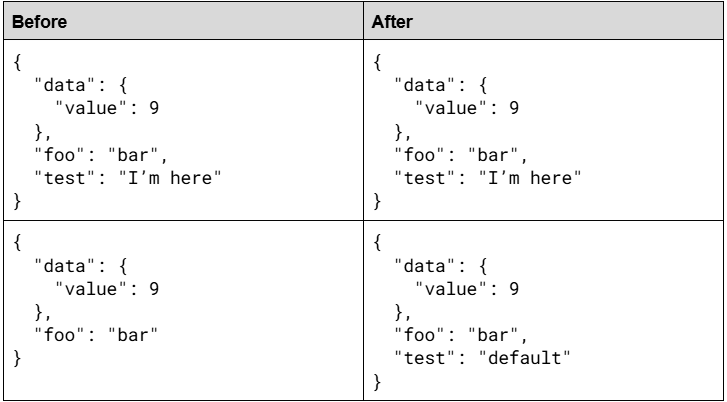
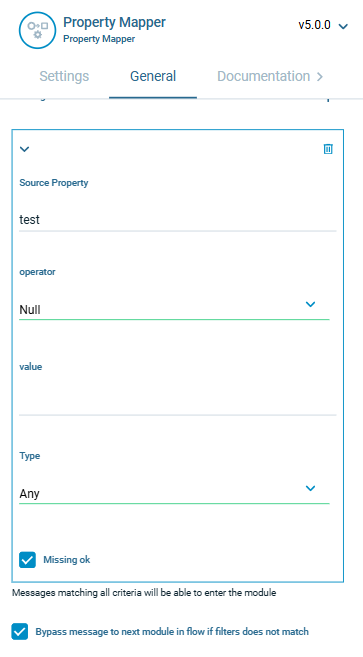
Let’s say we want to check if the property ‘test’ is present. If it is we just pass it along, if it’s not we want to add it with a default value of ‘default’. To do that we add a Property Mapper module where we add a message filter that is guaranteed to be false if the property exists. For example, if you expect string values on that property you can use the ‘Is Numeric’ filter. In this example we use the ‘Null’ filter which will be false for any valid strings. This also means that we will replace any null values with a default string.
With this filter we will block any message that contains valid data, and pass through messages where the ‘test’ property is missing or where the value is null. Not really what we want! Now comes the trick.
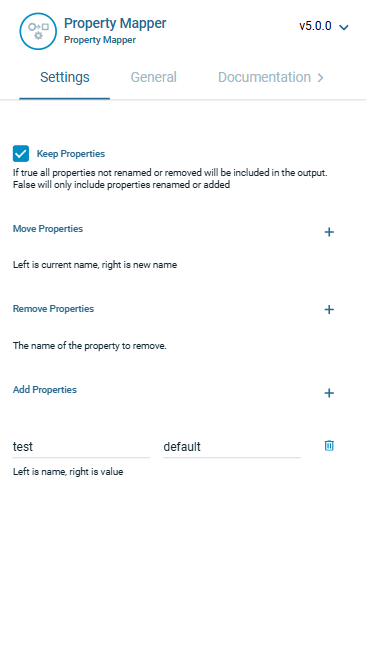
To get the behavior we want we first modify our filter by enabling the ‘Bypass message to next module in flow if filters do not match’ setting. Then any message with valid data will be passed along without modifications. Next we enable the ‘Missing ok’ setting. This will cause the filter to be true if the property is missing, in addition to the value being null. Finally we add the default value on the Settings tab in the ‘Add Property’ section, by assigning the value ‘default’ to the ‘test’ property. If it doesn’t exist it will be added, if it contains null it will be overridden. Problem solved!
Example: